



Page content
How you access your timetable is changing - read the below steps to make sure you can access your personalised timetable.
How to Access your Timetable
Stay organised and keep track of your classes with your personalised timetable.
We have changed things this year and you do not need to use the find timetable feature, your personalised timetable will be sent to the "my timetable" section in publish. Read on to find out more.
Before You Can Access Your Timetable
There are a few important steps to complete first:
- Completed your online course enrolment.
- Have your @ulster.ac.uk email address and password to log in.
- Set up University Wi-Fi and Multi-Factor Authentication (MFA) on your phone or device
When Will My Timetable Be Available?
Once you have completed your enrolment, your module selections will be sent to the University's timetabling system for processing.
Please note:
- It can take approximately 72 working hours after enrolment for your module choices to be processed and your timetable to be created.
- Enrolling as early as possible will help us process your timetable sooner.
- We aim to provide your personalised timetable within 72 hours, but sometimes it may take a little longer while we make sure everything is right for you.
If you haven’t received your timetable after 72 hours, please bear with us and avoid contacting the Timetabling Team just yet. Your timetable is still being worked on and you’ll receive it on publish as soon as it’s ready.
By giving us a little extra time, you’re helping us focus on the important job of building accurate, personalised timetables for you and your fellow students.
Thanks for your patience!
Where Can I View My Timetable?
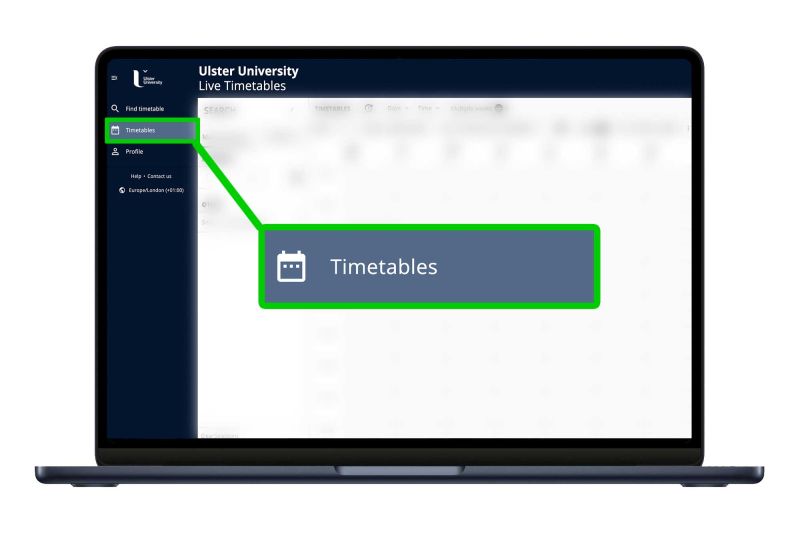
Your timetable will be available through Publish, the University's timetabling platform using the timetable icon shown below.
Please note that you should check Publish regularly, as your personalised timetable will be sent directly to publish for you to use and follow - keeping in mind it will take approximately 72 hours post enrolment.
We aim to provide your personalised timetable within 72 hours, but sometimes it may take a little longer while we make sure everything is right for you, as your module registrations are processed, you will see timetable entries being added gradually.
Find out more
If you have questions about the classes, modules or teaching activities you have been allocated, please contact your Course Team in the first instance.
If you are unable to access your timetable, or if you experience any issues viewing it, please contact the Timetabling Team, who would be happy to help.