




In this section
About SafeZone
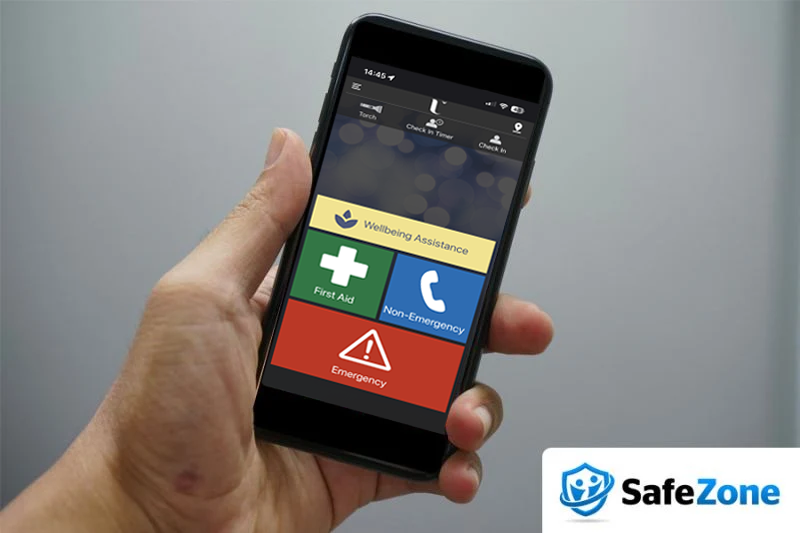
Ulster University has teamed up with technology firm CriticalArc to provide SafeZone, a free new app for students and staff that connects you to the University security team if you ever need urgent help, first aid or if you have an emergency while on campus.
Safezone Features
First Aid

Emergency
If you feel threatened or need urgent assistance.

Non-Emergency Help

Wellbeing Assistance

Check in/Check out timer
Share your location with security so they can help you in the event of an emergency.
Getting started with SafeZone
1. Download the app
Search for "SafeZone" in the App Store or Google Play, or use the download buttons on this page.
2. Register with your Ulster email
Sign in using your Ulster University email address so the app recognises you as part of our community.
3. You're ready to go
SafeZone is now available for your use on all of our campuses.
Frequently asked questions
Everything you need to know about the SafeZone app before you download it.

SafeZone is free to download from the App Store or Google Play. Search for "SafeZone" and install the app, then register using your university email address, name and phone number to activate it for use across Ulster University campuses.
SafeZone does not track your location. You only become visible on the system once you have raised an alert or checked in. For further information see the Privacy Commitment.
No, SafeZone is completely optional and is simply intended as a more efficient and responsive way of communicating with the Security team. We encourage staff and students to use the app but you are under no obligation to download or register it.
SafeZone works across all university campuses. You can view the exact boundaries by tapping 'Regions' in the SafeZone app menu.
When your alert is activated, Campus Security will receive the alert within seconds and call you immediately. If you are unable to talk without being overheard you can use the two-way messaging chat to provide security with further information.
SafeZone requires your name, University email and phone number to function.

Why it matters